A structured natural language that compiles to React, Laravel Blade, or HTML.
One .eng file. Any framework. Code output quality depends on the LLM you choose.
One .eng file compiles to multiple targets
---
type: component
name: FeatureCard
props:
- name: icon
type: string
- name: title
type: string
- name: description
type: string
---
Create a card, padding large, rounded, border gray:
Style this with hover shadow, transition 200ms
Create icon circle, bg primary, 48px, rounded:
Icon {icon} size 24px, color primary
Show {title} as heading, bold
Show {description} as paragraph, muted
import React from 'react';
import { Star } from 'lucide-react';
export default function FeatureCard({ icon, title, description }) {
return (
<div className="p-6 rounded-lg border
border-gray-200 hover:shadow-md">
<div className="w-12 h-12 rounded-full
bg-indigo-100 flex items-center
justify-center mb-4">
<IconComponent size={24} />
</div>
<h3 className="text-xl font-bold">
{title}
</h3>
<p className="text-gray-500">
{description}
</p>
</div>
);
}
<article class="p-6 rounded-lg border
border-gray-200 hover:shadow-md">
<div class="w-12 h-12 rounded-full
bg-primary/10 flex items-center
justify-center mb-4">
@switch($icon)
@case('dashboard')
<svg class="w-6 h-6 text-primary">...</svg>
@break
@endswitch
</div>
<h3>{{ $title }}</h3>
<p>{{ $description }}</p>
</article>
<!DOCTYPE html>
<html lang="en">
<head>
<script src="https://cdn.tailwindcss.com"></script>
</head>
<body>
<div class="p-6 rounded-lg border
border-gray-200 bg-white
hover:shadow-md transition-all">
<div class="w-12 h-12 rounded-full
bg-indigo-100 mb-4">
<svg>...</svg>
</div>
<h3 class="text-xl font-bold">
Visual Sprint Boards
</h3>
<p class="text-gray-500">
Drag-and-drop Kanban...
</p>
</div>
</body></html>
A structured language that sits between English prompting and actual source code.
Same .eng file always produces the same JSON AST. No ambiguity. No guessing.
One source compiles to React, Laravel Blade, HTML, and more. Write once, deploy anywhere.
Uses Claude, GPT, Gemini, or your local CLI. doteng gives the LLM structured, unambiguous intent — output is only as good as the model behind it.
Compiled outputs cached by AST hash. Unchanged files skip the API call entirely on rebuild.
Use --serve to auto-start Vite, artisan, or a static server. Preview instantly.
Use --cli to compile through your Max subscription. Zero API costs.
Deterministic parsing. Non-deterministic code generation. Be aware of the difference.
Write structured English in .eng files. Keywords like Create, Show, Loop, If, Set, Bind describe your UI and behavior.
The lexer and parser produce a deterministic JSON AST. Same file, same AST, every time. Validated for errors before compilation.
The AST + target + theme config are sent to an LLM. doteng structures the prompt — the LLM generates the code. Output quality varies by model.
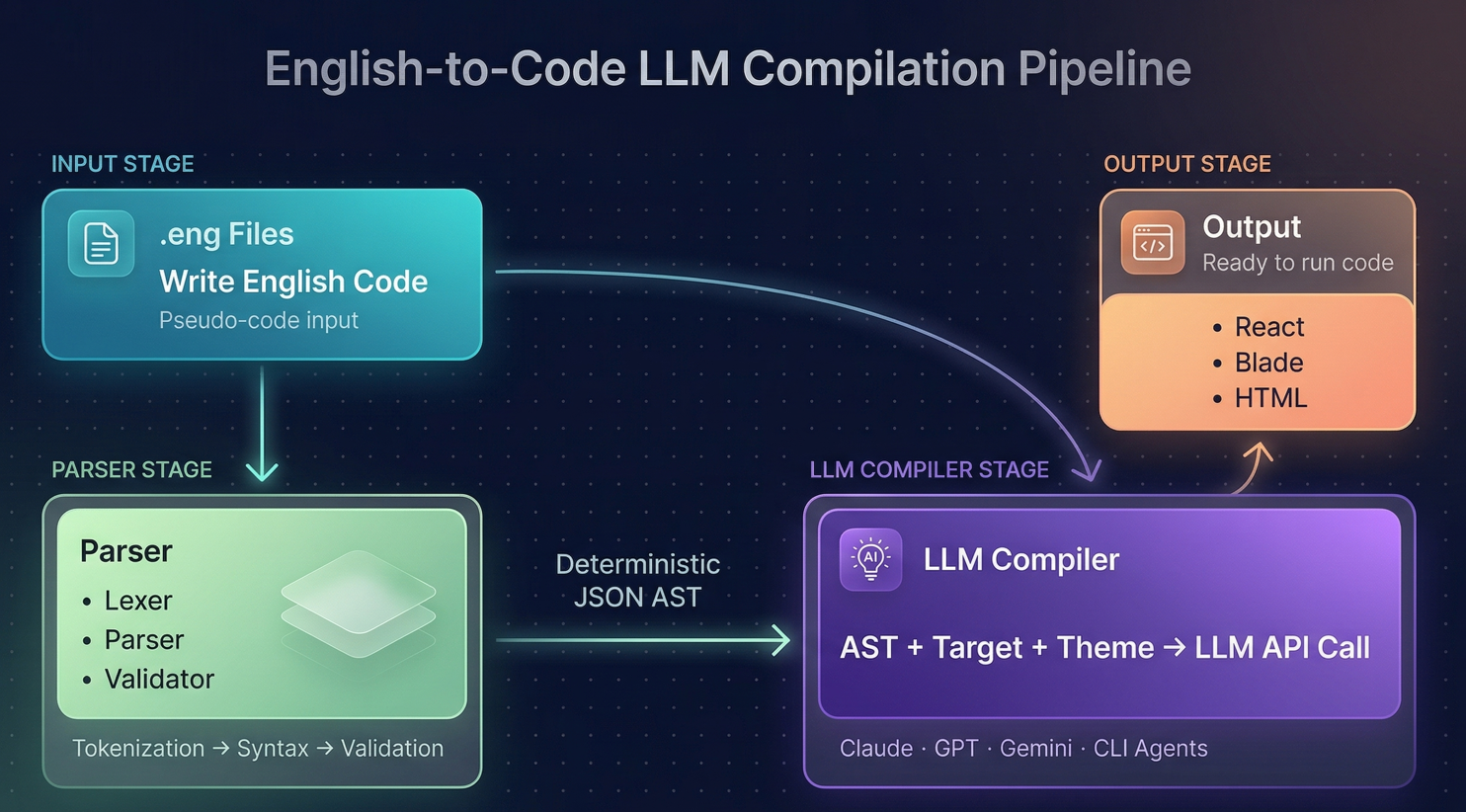
A note on output quality: doteng's parser is fully deterministic — same .eng file always produces the same AST. But the final code generation step is powered by an LLM, which means output can vary between runs, models, and providers. Think of doteng as a structured way to prompt — not a traditional compiler with guaranteed output. Better models produce better code.
Same source. Multiple frameworks. Output quality depends on the model.
JSX + Hooks + Tailwind + Vite
--target=react
Templates + Routes + Controllers
--target=laravel-blade
HTML + Tailwind CDN + Vanilla JS
--target=html
Vue, Svelte, Next.js, Angular, and more targets are planned.
Use the model you want. Switch providers with a flag.
Anthropic
claude-*
OpenAI
gpt-* / o1-*
gemini-*
DeepSeek
deepseek-*
Claude CLI
--cli (free)
# Install
$ npm install -g @dotenglang/doteng
# Create a project
$ doteng init my-app
$ cd projects/my-app
# Build to React and preview
$ doteng build . --target=react --serve
# Or use Claude Code CLI (free for Max plan)
$ doteng build . --target=react --cli --serve
Star the repo, try it out, or contribute a new compilation target. Every PR is welcome.